Kiến trúc
AI Agent
7 thành phần cốt lõi · So sánh 5 sản phẩm thực tế.
01 · Bản đồ 7 thành phần
Hub-and-spoke quanh LLM. Sơ đồ kinh điển
02 · Bóc tách từng thành phần
Reasoning · Perception · Planning · Memory · Tools · Comm · Guardrails
03 · So sánh 5 sản phẩm thật
Claude Code · Cursor · OpenAI Assistant · Gemini CLI · Aider
04 · Áp dụng vào hệ của bạn
Checklist thiết kế · anti-patterns · template tham khảo
Bản đồ
7 thành phần
👀 Perception
Parse input (text, ảnh, file, sự kiện) — trích entity, intent, ràng buộc.
Reasoning Engine
LLM nền — sinh kế hoạch, đánh giá, viết action.
Gemini · Claude · GPT · Llama …
🔧 Tools
API, DB, browser, code interpreter — mỗi tool có schema + side-effect.
📝 Planning
Chia mục tiêu thành các bước. CoT, ReAct, Reflection.
💬 Communication
Người ↔ agent & agent ↔ agent (A2A, MCP, structured output).
💾 Memory
Short-term (phiên) + Long-term (vector DB, file, KV).
🛡 Guardrails
Lọc input/output, kiểm tra action, logging, eval định kỳ.
7 khối ghép lại → năng lực Perceive → Plan → Act → Learn. Mọi sản phẩm agent thực tế đều là một biến thể của 7 khối này.
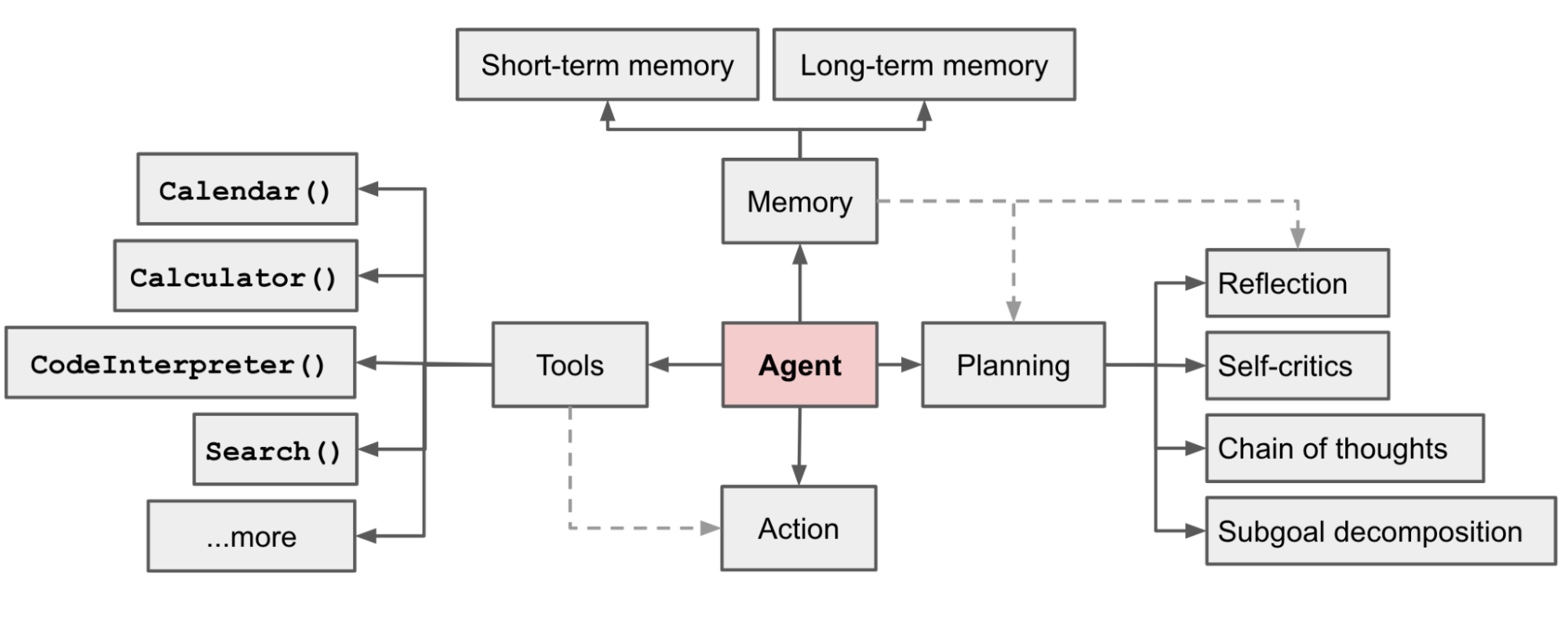
© Lilian Weng — "LLM Powered Autonomous Agents" (2023)
Khung Lilian Weng
- Agent (LLM) — bộ não trung tâm.
- Planning — Subgoal & Reflection.
- Memory — Short / Long term.
- Tools — Calendar, Calc, Search, Code…
- Action — tác động lên Environment.
Khác biệt với bản 7 khối: Perception, Communication, Guardrails được tách rõ — phù hợp với hệ production.
Bóc tách
7 thành phần
Vai trò
Khi chọn model — 4 tiêu chí
- Tool-use quality — gọi tool đúng, đúng tham số, không bịa.
- Reasoning depth — extended thinking cho task khó.
- Context window — 200k / 1M? đủ cho repo của bạn?
- Cost / token — agent xài rất nhiều token vì retry, plan, reflect.
Pattern phổ biến: Mix models
"1 model lo tất cả" rẻ thì rất đắt — task đơn giản cũng chạy model lớn. Trộn theo task tiết kiệm 3-10x.
Vai trò
Các nguồn đầu vào điển hình
- User chat (text, audio).
- File đính kèm (PDF, ảnh, code).
- Webhook / sự kiện hệ thống (PR mới, alert).
- Screenshot / DOM của browser (vision agent).
Pattern: Pre-processing pipeline
Anti-pattern: nhét file PDF 200 trang nguyên xi vào prompt. Pattern tốt: tách section, chỉ giữ phần liên quan.
Chain of Thought
Model tự nói ra các bước suy luận trước khi đưa câu trả lời. Đơn giản nhất.
Khi: task có nhiều bước nhỏ.
ReAct
Vòng Reason → Act → Observe. Model luân phiên suy luận và gọi tool.
Khi: cần tool use lặp đi lặp lại.
Plan-and-Execute
Tách rõ plan agent (1 model lớn) và execute agent (model nhỏ chạy từng bước).
Khi: workflow phức tạp, dài.
Tree of Thought
Khám phá nhiều nhánh giải pháp, đánh giá, chọn nhánh tốt.
Khi: task có giải khác nhau (giải toán, code thuật toán).
Reflection
Sau khi xong, model tự critique, nhận lỗi, làm lại.
Khi: chất lượng > tốc độ.
+ Stop condition
Mọi planner cần điều kiện dừng (max steps, ngân sách token, signal "done").
Tránh: loop vô tận, "agent hyperactive".
Sẽ học sâu mỗi pattern ở S-07 (Tool Use) và S-08 (Planning & Reflection).
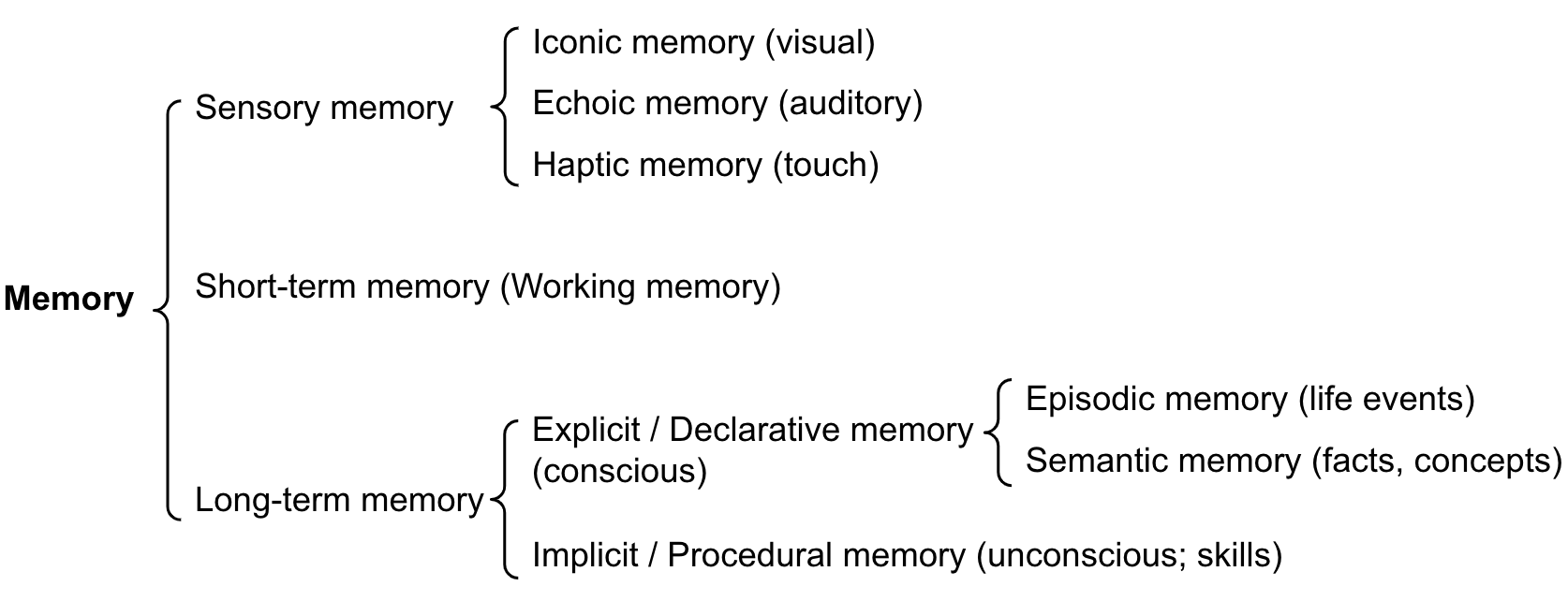
© Lilian Weng (2023) — Categorization of memory
3 lớp trong thực hành
Working — trong context
Conversation history. Tự nhiên có. Giới hạn = context window.
Episodic — sự kiện đã xảy ra
"Lần trước user X đã làm Y." Lưu file / DB → recall khi cần.
Semantic — kiến thức tích luỹ
Vector DB, knowledge graph. Search bằng nghĩa, không bằng chữ.
Chi tiết: S-09 — Memory & RAG.
Anatomy 1 tool
Tên tool + mô tả + ràng buộc → quyết định 80% chất lượng tool-use.
Checklist 1 tool an toàn
- Idempotent nếu có thể — gọi 2 lần ra cùng kết quả.
- Dry-run mode cho action có side-effect (gửi mail, charge card).
- Rate limit & retry strategy.
- Permission — tool nào cần human confirm.
- Output ngắn gọn, có schema — không xả raw 10k dòng.
- Log mọi call kèm input/output (PII redact).
"50% chất lượng agent nằm ở thiết kế tool. LLM giỏi đến mấy mà tool tệ thì agent vẫn dở."
UX layer
Chat, slash command, voice. Stream token, hiển thị tool call.
UI cho phép interrupt, edit prompt, retry — không có thì user không sửa được lỗi agent.
Tool protocol
JSON function calling là chuẩn. MCP chuẩn hoá toolset external.
Structured output (JSON Schema, XML tags) đảm bảo parse-able giữa các bước.
A2A protocol
Multi-agent cần handoff format chuẩn: input, output, context tóm tắt.
Sẽ học sâu ở S-04 (Agentic) và S-10 (MCP & A2A).
Nguyên tắc: càng chuẩn hoá format càng dễ thay thế thành phần. Ngày mai đổi model / tool / agent vẫn chạy.
4 lớp rào chắn
- 1 Input filter — chặn prompt injection, PII rò rỉ ngược.
- 2 Tool gate — hook chặn lệnh nguy hiểm (rm -rf, force push, drop table).
- 3 Output filter — kiểm tra response chứa secret, link xấu, instruction nguy hiểm.
- 4 Human-in-the-loop — checkpoint trước action không thể undo.
Eval & observability
3 mức eval
- Unit — tool có schema đúng, prompt có biến đúng.
- Trajectory — agent đi qua đúng các bước.
- Outcome — kết quả cuối có đáp ứng yêu cầu?
Tracing tools
LangSmith, Langfuse, OpenTelemetry — log mỗi turn, mỗi tool call để debug được.
Sẽ học sâu ở S-11.
So sánh 5 sản phẩm thật
Mỗi sản phẩm = một biến thể
Claude Code
Triết lý: file-based config, mọi thứ checked-in git.
Cursor
Triết lý: tight IDE integration, UX là first-class.
OpenAI Assistants API
Triết lý: fully managed — Threads & vector store là server-side.
Gemini CLI
Triết lý: multi-modal first + 1M context window.
Aider
Triết lý: git-native, mỗi action = 1 commit.
Mọi thứ đều có 7 khối — chỉ khác cách triển khai
| Khối | Claude Code | Cursor | OpenAI A. | Gemini | Aider |
|---|---|---|---|---|---|
| Memory file | CLAUDE.md | .cursor/rules | Threads | GEMINI.md | .aider.conf |
| Model mix | ✅ | ✅ | OpenAI only | Google only | ✅ |
| Hooks | ✅ native | Limited | Webhooks | Limited | Git hooks |
| MCP | ✅ | ✅ | ✅ (2025+) | ✅ | Limited |
| UI | Terminal | IDE | API only | Terminal | Terminal |
Khác sản phẩm khác triết lý — nhưng cùng 7 khối. Hiểu khối thì học bất kỳ sản phẩm nào cũng nhanh.
Áp dụng vào
hệ của bạn
Đặt câu hỏi cho mỗi khối
- R Reasoning — task của bạn cần model nào? Tách plan/act/scan?
- P Perception — input nào? Cần clean trước không?
- L Planning — chọn CoT/ReAct/Plan-Execute? Stop condition?
- M Memory — cần xuyên phiên? Dùng vector / SQL?
- T Tools — list tool tối thiểu? Có dry-run mode?
- C Comm — UI có cho phép interrupt, retry?
- G Guardrails — action nào cần human confirm? Eval ra sao?
Template tham khảo — đặt mọi thứ vào file
Mọi thứ checked-in git để reproducible + team review được.
❌ Sai phổ biến
Mega-prompt agent — 1 prompt to dài làm tất cả. Khó debug, dễ drift.
1 model lo tất — Opus cho cả task nhỏ → cost x10.
Bật hết MCP — 20 servers × 50 tools = ngạt context, model bối rối.
Tool xả raw — bash trả 10k dòng → context vỡ.
Không stop condition — agent loop vô tận, tốn tiền.
Không log trace — bug xảy ra → bó tay debug.
✅ Cách làm tốt hơn
Tách Plan agent + Execute agent; mỗi phần ngắn, rõ vai.
Trộn model theo task — Opus cho plan, Sonnet cho act, Haiku cho scan.
MCP theo profile (dev / debug / docs); on-demand load.
Tool có output schema + truncate; tóm tắt trước khi feed.
Max steps + token budget + signal "done" rõ ràng.
Tracing (LangSmith/Langfuse) ngay từ ngày 1.
Mọi agent đều là biến thể của 7 khối hub-and-spoke: Reasoning · Perception · Planning · Memory · Tools · Comm · Guardrails.
Reasoning là cốt — nhưng 50% chất lượng nằm ở thiết kế Tool. Tool xấu = agent dở dù model giỏi.
Mix models theo vai trò (Plan/Act/Scan/Eval) — tiết kiệm 3–10x cost mà chất lượng tốt hơn.
Claude Code · Cursor · OpenAI · Gemini · Aider khác triết lý nhưng cùng 7 khối. Hiểu khối → học cái nào cũng nhanh.
Guardrails & observability từ ngày 1 — không phải bài tập về nhà sau khi vào prod.
Thực hành
- Vẽ kiến trúc 7 khối cho 1 agent bạn đang dùng.
- List 3 tool quan trọng — đã có schema rõ + dry-run mode chưa?
- Thử "mix model" trên 1 task: model lớn plan, model nhỏ act.
Đọc trước S-04
- Sách: Chapter 7 — Multi-Agent.
- Anthropic — How we built our multi-agent research system.
- CrewAI docs — Role / Task / Crew abstraction.
Tham khảo
- Lilian Weng — LLM Powered Autonomous Agents.
- Anthropic — Building Effective Agents.
- OpenAI Assistants & Anthropic Claude Code docs.
Buổi 4 — Kiến trúc Agentic (Multi-agent)
Khi 1 agent không đủ: Orchestrator, Workers, A2A, shared state.